
You’re not forgetful — you’re outnumbered.
The second brain that rings you back.
Speak it. Snap it. Stash it. Your squirrel files everything — and for the one thing you can’t miss, it calls your phone — and you can talk right back.
We’ll email you the moment it’s ready · 7-day free trial · iOS

One squirrel, your kind of busy
What’s filling your brain?
Just want to watch it work? See the demo films
The big one · Pix
Some photos aren’t memories. They’re to-dos.
The receipt. The pill bottle. The flyer on the fridge. You snap these to remember them — and then they vanish into a camera roll where about 70% of photos are never opened again. The problem was never that you didn’t capture it. It’s that the one that mattered got buried.
Squirrel Brain is for thatphoto. Snap it and your squirrel reads it, works out what it’s for, and turns it into the reminder, the alarm, the call, or the link— then hands it back exactly when you need it.
Not a place to dump every photo — the other 4,000 pics stay right where they are.
Snap it → it becomes something that actually works:
For work
The whiteboard after a meeting
→ your follow-ups, pulled out as a task list
A business card
→ a saved contact + a nudge to follow up this week
An invoice with a due date
→ an alarm two days before it's due
The serial number on a broken part
→ saved for the warranty claim and the reorder
For family
A pill bottle
→ a call when it's time to take it, and a nudge to refill
The permission slip on the fridge
→ an alarm the night before it's due
The doctor's after-visit summary
→ the follow-up on your calendar, meds as reminders
A birthday party invite
→ the date on your calendar + “grab a gift” three days out
For you
A wine you loved at dinner
→ saved — with where to buy it again
Shoes in a store window
→ identified and found online, tucked into LinkStash
A book on a friend's shelf
→ added to your read-next list
The Wi-Fi password at the rental
→ saved — one tap to find it later

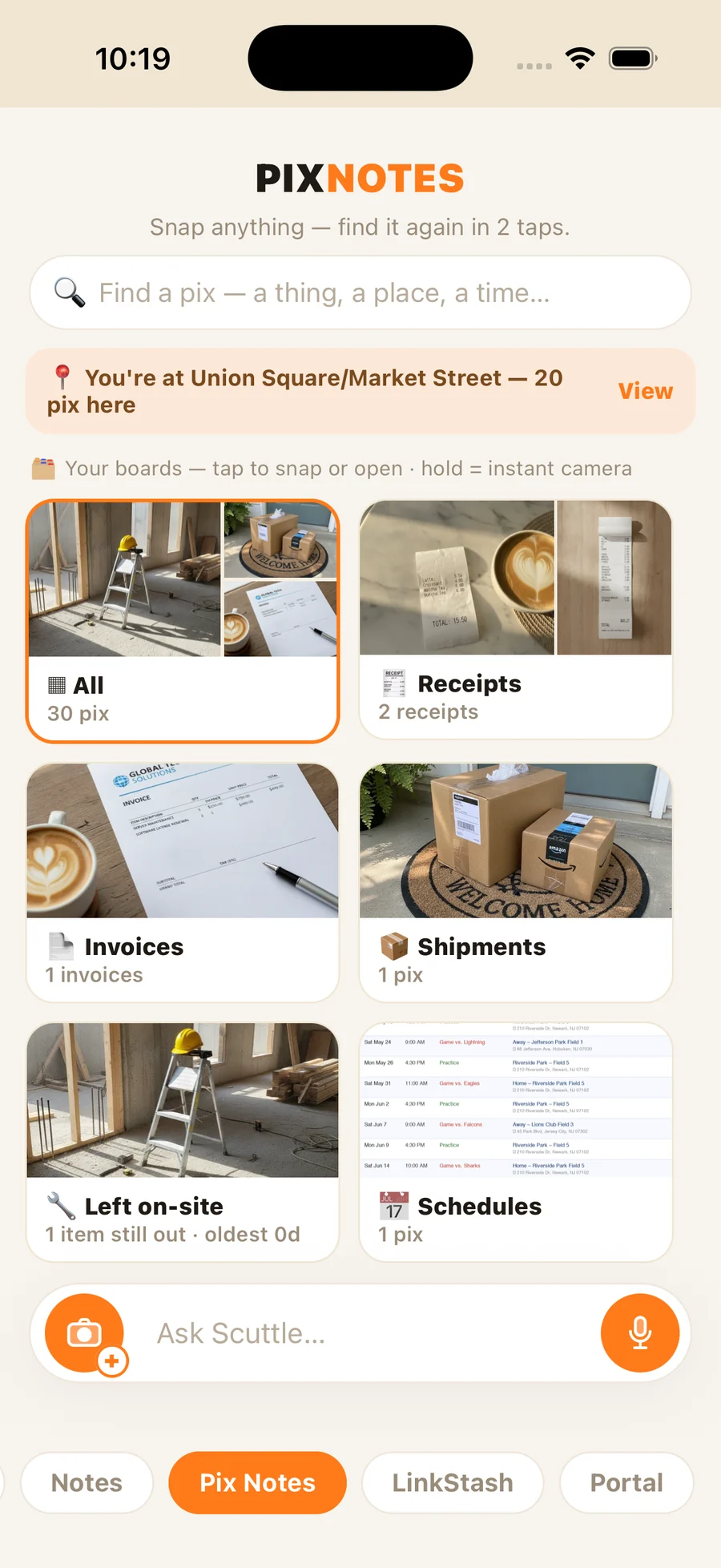
It reads what's in the photo
The date on the flyer, the name on the bottle, the price on the tag. Your squirrel understands the photo — you don't type a thing.
It turns dates into a real nudge
Anything with a when becomes a reminder, an alarm, or — for the one you truly can't miss — a phone call in your squirrel's own voice.
It knows what a thing is
Snap an object and it works out what it is, writes a clear description, and makes a real attempt to find where to buy it — saved as a link for later.
It's filed and findable
Each keeper lands on the right board, GPS-stamped with where and when — so it's there the second you need it, not lost in ten thousand others.
Your camera roll stays yours. Squirrel Brain just makes sure the photos that were really reminders actually remind you.
The follow-through
For the one thing you cannot miss — your squirrel calls you.
Not a notification. Not a banner you swipe away. A real incoming phone call— it rings when your ringer’s on, vibrates on silent like any call, and reaches you on a locked screen, even with the app closed and your phone face-down across the room. It cuts through the 200 other notifications you never opened.
Answer it and you’re not just listening — you talk back. Tell your squirrel to move the meeting, add a note, or walk you through your day, and it handles it right there on the call, out loud, in its own voice. A real back-and-forth conversation, not a recording. You can’t ignore it. The thing gets done.
Join the launch list
A preview of a real two-way call. In the app, you speak — out loud, in your own words — and your squirrel does it.
Common questions
Questions, answered.
What is Squirrel Brain?
Squirrel Brain is an iOS app that turns photos, voice notes, screenshots, and forwarded texts into reminders, alarms, and calendar events — then makes sure you follow through, including a real phone call that rings when your ringer's on, vibrates on silent, and reaches you on a locked screen.
How is it different from a notes app or the Reminders app?
Most apps only store what you capture — it just sits there. Squirrel Brain acts on it: it sets alarms, adds calendar events, organizes photos into boards, and calls you when something can't slip.
What happens to the call when my phone's on silent?
It comes through like a real phone call: it rings when your ringer's on, and vibrates on silent — exactly like any incoming call — and it shows on your locked screen either way. Because it's a real call, not a system alarm, the silent switch mutes the ring the same as it does for any call. You can also turn it off entirely with the app's own 'Silence all reminders' switch.
Can my AI tools use it too?
If you want — it's completely optional, and the app never needs it. Squirrel Brain has a built-in MCP portal, so an MCP-capable agent — Claude Code, Cursor, or one you run yourself — can set alarms, file notes, and even have your squirrel call you. Everything about it lives on the MCP page.
Where do my photos and voice notes go?
They're processed to pull out what matters — a date, a name, an amount — and stored in your own private account, visible only to you. Your camera roll stays yours: Squirrel Brain only touches the photos you hand it, never scans your library, and you can delete anything you've saved at any time.
What does it cost, and what devices does it run on?
iPhone only for now. Two simple plans, billed monthly with a 7-day free trial: Standard is $9.99/month with 10 hours of meeting recording, and Plus is $14.99/month with 20 hours. Everything else — photos, notes, reminders, voice capture, phone-call alarms, link stash, and the Burrow — is unlimited on both. Squirrel Brain is pre-launch — join the launch list and you'll be first into the beta.
Your memory is full. Let your squirrel carry it.
Nothing slips anymore — not because you got more disciplined, but because you stopped having to be. You’re one forgotten text away from wishing you’d had this.
We’ll email you the moment it’s ready · iOS · 7-day free trial